Monday, 30 September 2024

ShortWave


Love this application, available on Linux. I did check, but it does seem to be exclusive to Linux.

I came across it fortuitously while looking for radio-related applications in my software manager. There are literally 1000s of stations available for your listening pleasure, entirely justifying the excellent appellation.  

As a child, I whiled away many a happy hour oh so carefully turning a dial on an analogue short wave radio to bring in distant stations. And who can forget the mystery of the numbers stations, and the feeling that if you listened long enough the mystery would be revealed.

On a practical note, the BBC has decided you can't listen to its stations online unless you log in, and you don't with this (need to log in, that is). Just search for the station and click on the one you want to listen to. 


You can also choose to create library of stations you want. Here, I'm going to add BBC Radio 3 to my library. 


And, below, my limited library: 


Saturday, 14 September 2024

JMeter Refresher

Again, as with my previous post, it's best to think of this as my course notes. These are meant for me to revisit and understand. I believe it's important to make your learning as accessible to you as possible. Often the way something's explained can be a barrier to your understanding, making it (usually unintentionally) sound more complicated than it actually is. Unfortunately, this puts a lot of people off learning, which is a shame. 

Firstly, I want to record the commands for reports. Note: I'm on a Linux machine. 

If you have an existing results file: sh jmeter -g somefile3.csv -o report-output/mytestreports1 -- this is really easy way to make pretty HTML reports out of existing results files. 


This is how to run the whole kit and kaboodle from the command line. You will need to have created the test in JMeter. 

sh jmeter -n -t "location of jmx test file" -l "location of result file" -e -o "location of reports folder"

And below an actual example: 

sh jmeter -n -t "TrainingHTTPTest.jmx" -l somefile9.csv -e -o "testreporting" 

It's worth noting that, apart from the test file (the one with the jmx extension), the other files, if they don't exist will be created. So you could do it again, thus:

sh jmeter -n -t "TrainingHTTPTest.jmx" -l resultfile12.csv -e -o "testreporting1"

For this simple test, the result file looks like this:


And a report, like the one above, will be created in a folder called testreporting1.

Apparently, when you're running a real-world performance test, you shouldn't be doing it from the GUI with lots of listeners, since this produces overhead. I knew this, and I know it can be important to ring every millisecond out of a performance test. 

So now to JMeter, which is where you create your case.  


You will need the following: 
  • thread group (think users: this simulates the amount of users)

  • a sampler to your thread group (sampler: think the request you want to make, the thing you want to do)

  • a listener (you need at least one of these to have any feedback. There are quite a few to choose from depending on the format you're after). Below is a listerner showing two runs, one that failed and one that passed:

You can use the following:
  • assertions (for example, the right code is returned, or a certain word appears on a page)
  • config element (these run before the sampler and set up initial conditions -- usually for the whole test plan (I think). 
  • pre-processors (things you want to have considered before the sampler runs)
  • post-processors (essentially doing something with the response)

Order of execution of JMeter elements:
  • Configuration elements
  • Pre-processors
  • Timers
  • Samplers
  • Post-processors
  • Assertions
  • Listeners

I went through Raghav Pal's JMeter Masterclass as a refresher course, which can be found here: 


It was a good refresher course, and reminded me that I'd probably made a six course dinner of some things first time round, by which I mean I over-thought and over-complicated them. I must have been in a bad mood last time I installed the Plugins Manager because I remember it as a bit of a faff. It's actually straightforwardly downloading a jar file and putting in a specific folder (learning's all about being in the right mood):


Restart your JMeter and you'll see it under the Options menu, thus:


Performance testing is an important non-functional aspect of testing. Increasingly, customers for software are interested in questions like: How will this behave under load? How many users can I have use a single instance at one time? And more granular questions, such as how long does each process take, or how long does your web application take to move from one process to the other. Can it do parallel processing, etc? JMeter is a free open source tool to answer these question. It's also something of an industry standard. 

I ignored the part of the course that referred to BlazeMeter, preferring to use the Test Script Recorder in JMeter instead. 

The next part of the course covers using JMeter for API testing, which I'll cover in another post. 

Sunday, 8 September 2024

Curling up

I spent Sunday morning (and some of the evening) with Curl and a tutorial. These are simply my course notes.

Curl is a bash/command line application that lets you do multiple different things. I use Linux, so Curl comes as standard. I believe it also comes as standard on a Mac. It used to be a bit of a faff on Windows, but now it comes as standard on W10 and 11. 

To download a web page, do this:

curl -L https://www.bbc.co.uk/sport/rugby-union > beebrugbyunionpage.html

What the above will do is download the source code of the rugby union web page into a file called beebrugbyunionpage.html, which you can then open in your browser. The response in the command line will look like this: 


If you then find your file in your file manager and open it, you will see the web page, thus (note the "URL"):


For the sake of understanding, let's get rid of this bit: "> beebrugbyunionpage.html". So, we're now running: 

curl -L https://www.bbc.co.uk/sport/rugby-union

The above command will return all the source code to your command prompt, thus:


And, as you can see from the position of the scroll bar, it goes on a bit. The point is, though, if you copied all of it and saved it in a file with an .html extension, you would have exactly the same file as the one created by "> beebrugbyunionpage.html". The -L switch tells Curl to follow redirects, which are very common. 
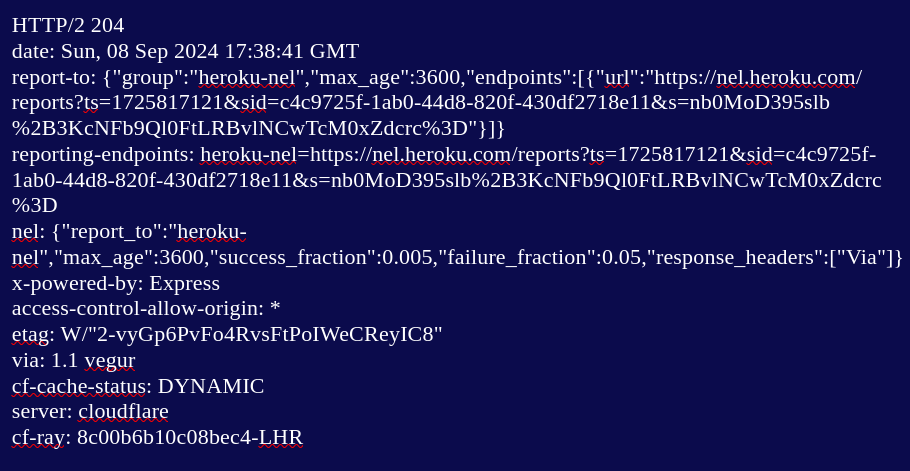
If you wanted to get only the headers from the same page, you would do the following: 

curl --head https://www.bbc.co.uk/sport/rugby-union

Which would return something like this:


Just for the sake of it, I tried this:

curl --head https://www.bbc.co.uk/sport/rugby-union > headers.html

When you open that in a browser, it looks like this:


Note: curl -I and the URL will also bring back only the headers. As far as I can gather, curl -I and curl --head do exactly the same thing. 

I had some chat on Mastodon while I was doing this and someone sent me this: 

curl parrot.live -- which will give you a boogying ASCII parrot.

And this:

curl http://wttr.in/Plymouth -- which will give you the weather in the named town. It looks like this in the command line:


And this:

curl qrenco.de/example.eu  -- will create a QR code for the stated link. I'm a bit suspicious of QR codes and don't have a phone that can read them. 

To get details of the client-server interaction, do the following: 

curl -v https://www.bbc.co.uk/sport/rugby-union -- which will return a lot of detail.

curl --trace file.txt  https://www.bbc.co.uk/sport/rugby-union -- which will produce a file called file.txt with a lot of detail and looks something like this (though it goes on for a bit):


Don't know why the below isn't exactly the same, but it isn't:

curl --trace https://www.bbc.co.uk/sport/rugby-union > file2.txt -- produces the following error: "curl: (2) no URL specified"

To send headers in a request, do the following:

curl -H "Accept:SomeHeader/JSON" https://reqres.in/api/users/2 

Apparently, the following is what's expected, though I'm not sure why: 


And now for a POST request:

curl https://reqres.in/api/users --data "name=morpheus&job=leader" -- this will return the following:


It's somewhat different, however, if you want to use the entire JSON, which looks like this:

I have to get this in a single line, so:  {"name": "morpheus", "job": "leader"}

So your curl should look like the following:

curl -X POST -H "Accept:application/json" https://reqres.in/api/users -d '{"name": "morpheus", "job": "leader"}'

And this is what you're after by way of response:


And similarly a PUT request (with -i added to get the headers): 

curl -i -X PUT https://reqres.in/api/users/2 -d '{"name": "morpheus", "job": "accountant"}'  -- returns the following:


And, finally, before I curl up into a ball, a DELETE request: 

curl -i -X DELETE https://reqres.in/api/users/2 -- and you should get the following response (204 means it's been deleted):


Apparently, there's a lot more you can do with Curl, but that's for another day. But I might end this post by doing the following after I've posted it:

curl https://techstuffandnonsense1.blogspot.com/2024/09/ > curling-up.html

And now if you go to your file manager and locate curling-up.html and open it, you will see the following: 


Time to curl up with a nice cup of tea.

Friday, 6 September 2024

Following instructions; avoiding assumptions (part 2): writing the ISO to a USB drive

The Linux Mint .iso image has been downloaded to your computer and is probably in your Downloads folder on your hard disk: 

linuxmint-22-cinnamon-64bit.iso

We now need to write it to our USB drive. A reminder of our mission statement:

Linux Mint is a popular Ubuntu-based distribution that we're going to download as an .iso file; we're then going to write the .iso to a USB thumb drive and boot into the live environment. This will allow you to explore Linux without making any changes to your computer. If we're happy with the live environment, we're going to take the next step and install it on our computer. 

We've done the first bit. To write the image to our USB drive we will need a tool like Rufus (on Windows) or Balena Etcher (available for Windows, Mac, and Linux). I'm going with Etcher, but other tools are available. Etcher is free for individual use and can be downloaded from here:

https://etcher.balena.io/

Scroll down and you will see the following: 


Choose "Download" next to the one that fits your operating system. With Etcher installed, open it. It will look like the following:


Choose to "Flash from file". This will open your file manager. Navigate to the .iso and select it. File will be selected, and you will move on to the next stage. 


Click on "Select target". A select target box will open with a list of available drives. This is what it looks like on Linux. Here it's sensibly showing only the USB I've plugged in, and NOT the hard disks in my computer. 


However, it could display other disks. The point is you need to be sure of your target BECAUSE everything on the target will be overwritten, and that would make for a very bad day if you get it wrong. So plug in your USB drive, identify it, and choose that as the target when running Etcher.

Once the file and target have been selected, simply click Flash and the process will begin. Be patient and wait for Etcher to tell you the process has completed. 

Close everything down, remove the USB thumb drive, and back away from the computer. Nothing has changed except that you now have an operating system on the USB drive that can be booted, used, and ultimately installed on any number of computers. For free. Legally. 

I wondered if I should end this by booting triumphantly into the live environment, but decided it would be a better fit for the start of "(part 3)". In "(part 3)", we'll be booting to the USB drive, using the system for a while without making changes to our computer, and ultimately then taking the big step of actually installing the system on to our computer. 

Monday, 2 September 2024

Apache JMeter

I once had an acquaintance -- a moved-on colleague -- who worked exclusively with JMeter, or so he claimed. His job title was Performance Tester, and I was led to understand that JMeter was all about performance testing, load testing, stress testing.  I remember being somewhat surprised because at that point I had been naively oblivious to the specialist trends in IT. He had mastered one piece of software and was making a good living at it. I asked him if it was hard, and he said, "No, I just push a button, wait for the run to end, produce the report, and repeat with a different number of users. Sometimes I change the environment it's pointing at."

I asked if it was hard to set up, and he replied that he hadn't set it up. The setup had been done before he arrived. That occasionally something went wrong and he had to work out what it was and fix it, which could be fiddly and tiresome. These bumps in the road apart, he liked his job and had it down pat. 

Other than my above former colleague, I've never met anyone who likes JMeter. There are tutorials explaining how straightforward it is, how easy to master it is, how widely used it is, etc, lifting your heart and soul to the sure and certain knowledge that you, too, can become a performance guru. And then you point it at the software that is your bread and butter and it's glitch after glitch, error after error, frustration after frustration. I don't know anyone who thinks it's intuitive, Oh, and I remember the fun we had setting up the Firefox proxy for JMeter, which promised to make everything plain sailing. Except it didn't.

Perhaps you think this is just me. Sour grapes on the part of someone who couldn't get to grips with it. It truly isn't. I'm someone more than ready to blame my lack of understanding ahead of blaming the tool. No, I've discussed JMeter with many testers who have used it for its intended purpose and they've come away frustrated... and relieved when they get a break from it. 

Lest this all seem like protracted gripe, it's actually a prelude to me spending some days doing Raghav Pal's JMeter Masterclass, which can be found here: 

https://www.youtube.com/watch?v=SoW2pBak1_Q

I'm currently enjoying learning Katalon, but it's good to break it up a bit. Who knows? I may chance upon a tool that really suits me. 

Sunday, 25 August 2024

Following instructions; avoiding assumptions (part 1): downloading the ISO

For the sake of this exercise, I'm going to ask you to do something simple. In this particular case, the downloading of an .iso of the latest Linux Mint to your computer's hard disk.  

There are quite a few assumptions here: that you know what's meant by download; that you know what Linux MInt is and that you know what an .iso image is. 

Often, it helps to have a statement of what we want to achieve and why we're doing it. So...

Linux Mint is a popular Ubuntu-based distribution that we're going to download as an .iso file; we're then going to write the .iso to a USB thumb drive and boot into the live environment. This will allow you to explore Linux without making any changes to your computer. If we're happy with the live environment, we're going to take the next step and install it on our computer. 
Well, okay, you're reading my channel, so I'm entitled to a few assumptions. For example, you know how to open a browser and navigate the world wide web. If given an URL, I'm assuming you'll be able to get there. So please go here:

https://linuxmint.com/  -- you will be taken to the Linux Mint home page. 


The Download button is right there on the front page, so click on it. You might expect the download to start here, but it doesn't because there are choices to make, always a complicating factor. When you click on the Download button, you're taken here: https://linuxmint.com/download.php ... 


... where you have to decide what version of Linux Mint you want to download. We're going to download the flagship Cinnamon edition. 


Click the Download button. Again, the download doesn't start. You have to make more decisions and more choices. We're on a page where we have to choose a mirror (download location) from a list. Most will work, but there's no point downloading from a UK download mirror if you're in Australia. Also, there's this scary message, which most of us ignore, including almost every tutorial on downloading and installing Linux Mint (but it's about checking you have a genuine .iso): 


Scroll through the list of mirrors until you find one that takes your fancy. I'm in the UK, but there's nothing to stop me going German or Danish (adding a cup of coffee as it downloads).


Click on the link and the download will either start or your file manager will open inviting you to save it somewhere. The file name will look like this:


If the latter, navigate to where you want to save the file and click Save. The download will begin and all you have to do is wait. 

After all of the above -- avoiding assumptions isn't easy -- all we've done is download the file. We haven't done anything with it. The more complicated bit is still to come. 

I think I'll add "(part 1)" to the title, and pick it up in "(part 2)"

Wednesday, 21 August 2024

Ubuntu-based


"DistroX is a Ubuntu-based distro that provides a sleek desktop experience while being light on resources..."

"DistroY is a Ubuntu-based distro optimised for..."

"DistroZ is a Ubuntu-based distro designed to provide an easy transition for Windows users..."

I could go on. There are, in short, a lot of Ubuntu-based distros. Among my favourites are: 

  • Linux Mint
  • Linux Lite
  • Pop! OS (which has taken a sabbatical to essentially rewrite Gnome in Rust)
  • Zorin OS
  • Tuxedo OS (for KDE)
All the above are Ubuntu-based, but are independent distros in their own right, as distinct from the official flavours of Ubuntu, like Kubuntu and Xubuntu.

There's a chap called Titus on Youtube, who gets quite sniffy about all this forking. He avers that you only need three distros. Those are:
  • Debian
  • Fedora
  • Arch
He mentions Opensuse, which I would include, but dismisses it as too niche. He doesn't mention Slackware at all. He also rather charmlessly suggests you could eliminate 90% of "all these forks and Linux distributions and no-one would blink an eye.." Despite the smug, elitist tone, he does have a point, particularly when it comes to understanding why there are so many distributions. 

You and I could make our own distro. Let's call it John OS. So what do we want to base it on? Let's base it on Ubuntu in keeping with the title of the post (Ubuntu, itself, is based on Debian). So we take the Ubuntu base, and add an existing desktop -- say Cinnamon -- which we're going to customise to give it a unique look. Maybe move the bar to the top and set it to auto-hide, make it fatter or thinner, and install Plank at the bottom with our favourite selection of applications pinned. Let's go with Brave as the browser; Gnome Office (just to be different) as the office suite; Haruna as the media player. These choices will be described as "eccentric" if you're lucky enough to get reviews because there are more conventional choices: for example, Firefox is usually the first browser of choice. 

Distros come and go; there are lots of discontinued distros. Anyone remember Pinguy? But Titus's entirely valid point is that you could just have installed Debian or Ubuntu (to stick with the theme) and uninstalled and/or installed the things you needed to achieve the same effect. All the ingredients are out there; you can take the ingredients and bake the cake how you like. Distros are just ready made cakes in the patisserie window for you to choose from. 

Saturday, 17 August 2024

Ubuntu

Ubuntu came, saw, and conquered -- in Linux terms, that is. And not monetarily, a fact that would lead to all the subsequent bad decisions, after the "How do we monetise this?" question had reared its ugly head and wouldn't leave the room. It was released in 2004 and used Gnome 2.6 as its desktop environment. 

Based on Debian, Ubuntu was amazing. Straightforward to install with a curated selection of software rather than just everything thrown in. It stood the biggest chance of making whatever year the year of Linux on the desktop was supposed to be. They took some criticism for handing out CDs of their free operating  system in a nice cardboard wallet without mentioning Linux at all. But I understand the rationale. Linux had -- and still has (entirely unjustifiably in my opinion) -- a reputation for being geeky, difficult, not for ordinary users. And too many well-meaning Linux channels are too ready to heave an understanding sigh and go along with this, which is just fine and dandy for Microsoft. They don't want an informed population who demand the right to install and use an OS of their choice on their computers. I'll address these issues in future posts. 

Ubuntu back then certainly stood out, though I also remember Mepis as being easy to use and PCLinuxOS, but Ubuntu gained huge popularity and its creator had been to space. Fancy. Then came Unity and HUD. If memory serves, they also had a cloud storage facility like Dropbox, which they later abandoned due to cost. I can't quite remember the chronology, but they later abandoned Unity and went back to Gnome, but not before they'd cheesed off the Linux community with an unannounced kick-back arrangement with Amazon. I, too, have opinions about Amazon, sufficiently strong to stop me shopping there, but that's a subject for another post. Ubuntu then introduced and pushed Snaps and forbade their official community flavours -- Kubuntu, Xubuntu, Ubuntu Mate, et al -- from also shipping Flatpak. Other distros had caught up -- though, to be fair, quite a few were Ubuntu-based. But Ubuntu had fallen from its position of golden grace, and never got it back. And they probably don't care, having given up on the desktop as a revenue stream.  

A slight digression here on conjugating companies. Apparently, it should be singular, "The BBC is denying..."; "Canonical is the company behind Ubuntu..." But it feels odd to me, especially when using a pronoun. "The BBC has denied something or other. It stated that..." All this is by way of my explaining using the plural conjugation. Anyway, back to our tale of Ubuntu's tumble from the heights of Linux favour.

Arguably, a lot of the criticism of Ubuntu is a bit over-blown. Canonical is/are a corporation and therefore their raison d'etre is to make money. Any good they do or did is entirely incidental, and they did a lot of good in accelerating the usability of Linux on the desktop. To be clear, Ubuntu is still a good recommendation for new users; it's just that now there are so many alternatives -- Linux Mint, Fedora, MX Linux, Pop! OS (another story in the making) -- that don't come with the problematic baggage, even though said baggage can be rectified in a matter of minutes. Flatpak is easily installed; Snaps removed; Amazon purged. 

All this is, in many ways, too much knowledge and information. Why should you care? If you want to give Linux a go and someone offers to install Ubuntu for you, go for it. It often is -- and has historically been -- a newbie's first foray. And you're more than likely to have a good experience. There's certainly lots of support.

Friday, 16 August 2024

Before Ubuntu

Some of you will remember Linspire (Lindows) and Xandros. These were attempts to make Linux easy and break the Microsoft monopoly.They did not succeed because money talks and a dominant market position can be exploited. 

I bought Xandros -- absurdly it had activation, mimicking Windows -- and installed it on my computer. It wouldn't activate. The company, when I contacted them, worked with me to address the issue. They were glad of my patience and perseverance, and rewarded me with a Professional addition of Xandros, which I downloaded and installed. 

None of this was really in the spirit of Linux -- certainly it bore no relation to Stallman's vision -- but was rather an opportunistic space and time money-grab where some companies thought they could monetise Linux on the desktop. Xandros, I remember, had a sophisticated implementation of Wine called Crossover that allowed you to install Microsoft Office, only without Clippy. This was sold as a virtue. I believe Xandros later bought Linspire, who were subsequently paid by Microsoft to piss off, and piss off they duly did. 

I had tried a few "distros" by then: Suse -- not yet Opensuse -- Mandrake, which topped the charts for a while, Linspire (because they couldn't call it Lindows), Caldera, and the aforementioned Xandros. I almost certainly tried other distros from discs without knowing their names. 

Then came Ubuntu, which changed the game. 


DOS and all that

Once upon a time, along time ago, I had a 386 computer running Dos 5.0 and -- what I really liked -- Word Perfect 5.1, a truly wonderful word processor (all that blue). I used and enjoyed this unnetworked PC a lot, and one day I woke up to find it had contracted a virus -- a Spanish virus no less -- and wouldn't boot. I was appalled, disgusted, outraged, mostly because I had no idea how to remedy the situation.

I took it to a computer shop and asked the nice man behind the counter how much it would cost to fix. He said £25, which didn't strike me as a monstrous sum, probably a result of the fact I was considerably behind the curve and the world had moved on to Windows 9x something or other. Anyway, when he'd finished, I had what I had before only Dos had been upgraded to 6.22. Whoopity-do. I promised myself that this would never happen again. Not that my computer wouldn't fail to boot -- of course it would -- but that I wouldn't be able to fix the issue myself. 

To this end, I acquired Dos on disks -- various versions, though conventional wisdom had it that the latest was the best -- ready for the next time some foreign or home-grown virus infected my computer and stopped it from booting. I learned that these viruses were called boot viruses, and they would pass into history quite quickly. Quite rapidly, infecting networks became the aim of virus writers -- mostly for mischief, but sometimes for gain. 

Once I had all my software -- the OS, my word processor, a couple of games on disk -- I started installing things just for fun... until one day, in another flat, with my partner, I created a quad-boot system on a system with a 1GB hard disk, and danced around in an unseemly way consumed with an inappropriate excitement. For those of you interested, the four OSes in question were OS/2 from IBM, Linux (Caldera, I think), BeOS, and Dos. I used the OS/2 bootloader and was absurdly pleased that everything booted. I still have a box set of OS/2.

Many years later I would understand the politics of what was going on -- that Microsoft, for corporate reasons, was seeking to dominate the OS market by fair means or foul. Mostly foul. They killed off Dr Dos by making sure Windows wouldn't run on it. And leaned on manufactures to make sure BeOS didn't get a foothold. And so they came to market prominence -- so much so that the average computer user would come to view using Windows in much the same way as eating off a plate. Something that wasn't thought about, merely done, and justified -- if justification ever became necessary -- after the fact. 

It was at this point that Linux, an operating system free to install and use took a hold on my imagination. In a world where -- incredibly -- you didn't have a right to food, you did have a right to an operating system. Because Torvalds had decided to use Stallman's licence for the kernel he had created. I didn't understand back then that it was Stallman's vision to create a free OS, and that Torvalds had, by accident, stolen that vision by creating the kernel that made everything fall into place.

So began my trip down Linux Avenue, and my distaste for the corporate shenanigans that went on for no other reason than to protect their bottom line and their dominant market position. 

“Gigi” a go-go: LMDE 7

🐧Linux Mint has been the go-to distribution for users who want an out-of-the-box experience and an easy transition from Windows. It's w...